cut_torus_surface
Produces an angularly limited toroidal section centered on the z axis.
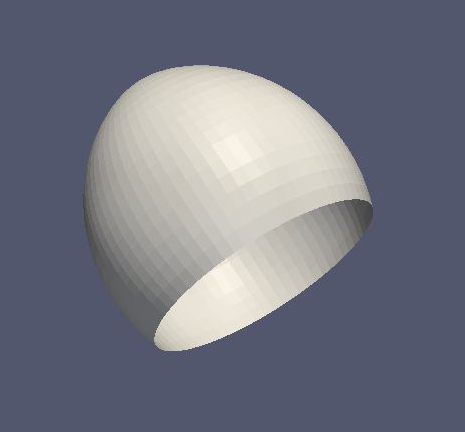
Works with MeshViewer: Yes.
Works with GeometryViewer: Yes.
<cut_torus_surface>KGCutTorusSurfaceAttribute |
Type |
Description |
|---|---|---|
|
|
axial mesh parameter (default is 64) |
|
|
|
|
|
the first r coordinate in meters |
|
|
the second r coordinate in meters |
|
|
the toroidal radius in meters |
|
|
is the arc on the right side of the directed line connecting point 1 to point 2? |
|
|
does the arc subtend less than pi radians? |
|
|
toroidal mesh parameter (default is 64) |
|
|
the first z coordinate in meters |
|
|
the second z coordinate in meters |
Example:
<cut_torus_surface name="cut_torus_surface" z1="0.3" r1="0.1" z2="-0.1" r2="0.2" radius="0.3" right="true" short="true" toroidal_mesh_count="128" axial_mesh_count="256"/>
Used as:
<cut_torus_surface>in <geometry>
More information
Explained in: Basic Shapes in KGeoBag
Appears in the documentation:
Basic Shapes in KGeoBag (Cut Torus Surface)
Used in example configurations: