poly_loop
A poly-loop is a closed sequence consisting of several lines and/or arcs that form a polygonal shape. The aequence
starts with <start_point ...> and ends with <last_line ...> or <last_arc ...>, and multiple <next_line
...> or <next_arc ...> elements can be put in between. An example of a poly-loop element is as follows:
<poly_loop>
    <start_point x="0." y="0."/>
    <next_line x="0.4" y="-0.1" line_mesh_count="10" line_mesh_power="2.5"/>
    <next_arc x="-0.1" y="0.4" radius="0.6" right="true" short="false" arc_mesh_count="256"/>
    <last_line line_mesh_count="10" line_mesh_power="2.5"/>
</poly_loop>
which creates a line from (0,0) to (0.4,-0.1) followed by an arc to (-0.1,0.4), and then the loop is closed by a line
back to the starting point. Note that poly-loop and poly-line are two-dimensional objects that operate in (x,y)
coordinates. Any line that is created by a <next_...> command goes from the end-point of the previous line to the
specified coordinate. The directive <last_line ...> or <last_arc ...> connects the first and last points with
the specified segment type.
The arc elements are described with the boolean parameters right and short, as shown here:
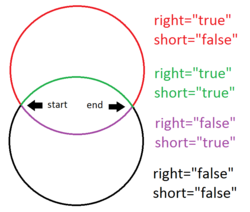
where right="true" means that the circle segment will be drawn clockwise, and vice versa. short="true" means
that the arc will be the shorter one of the two possiblities.
Element |
Description |
|---|---|
Used as:
<poly_loop>in <extruded_poly_loop_space><poly_loop>in <extruded_poly_loop_surface><poly_loop>in <flattened_poly_loop_surface><poly_loop>in <rotated_poly_loop_space><poly_loop>in <rotated_poly_loop_surface><poly_loop>in <shell_poly_loop_surface>
More information
Explained in: Basic Shapes in KGeoBag
Appears in the documentation:
Basic Shapes in KGeoBag (Extruded Poly-Loop Space, Extruded poly-loop surface, Flattened poly-loop surface, Poly-loop, Rotated Poly-Loop Space, Rotated poly loop surface, Shell poly-loop surface)
Used in example configurations: