extruded_surface
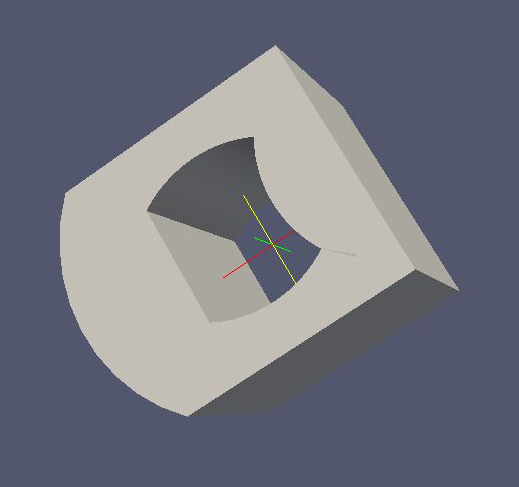
With this element it is possible to create an extruded surface (from a poly-loop like curve) with arbitrary holes in it.
The commands <inner_...> and <outer_...> define whether the extruded path will produce an outer or an inner
surface. Therefore, they define if there will be a hole in the surface and its shape.
Works with MeshViewer: Yes.
Works with GeometryViewer: No.
XML element:
<extruded_surface>C++ type:
KGWrappedSurface<KGExtrudedObject>Defined in: KGExtrudedObjectBuilder.hh:185
Element |
Description |
|---|---|
Attribute |
Type |
Description |
|---|---|---|
|
|
Example:
<extruded_surface name="example_extruded_surface">
    <extruded_object z_min="-1." z_max="1." longitudinal_mesh_count="40" longitudinal_mesh_power="2." closed_form="1">
    <inner_line x1="-.5" y1="-.5" x2="-.5" y2=".5"/>
        <inner_arc x1="-.5" y1=".5" x2=".5" y2=".5" radius="1." positive_orientation="0"/>
        <inner_arc x1=".5" y1=".5" x2=".5" y2="-.5" radius="1." positive_orientation="1"/>
        <inner_arc x1=".5" y1="-.5" x2="-.5" y2="-.5" radius="1." positive_orientation="0"/>
        <outer_arc x1="-1." y1="-1." x2="-1." y2="1." radius="{TMath::Sqrt(2.)}" positive_orientation="0"/>
        <outer_line x1="-1." y1="1." x2="1." y2="1."/>
        <outer_line x1="1." y1="1." x2="1." y2="-1."/>
        <outer_line x1="1." y1="-1." x2="-1." y2="-1."/>
    </extruded_object>
</extruded_surface>
Used as:
<extruded_surface>in <geometry>
More information
Explained in: Complex Shapes in KGeoBag
Appears in the documentation:
Complex Shapes in KGeoBag (Extruded Surfaces with holes)
Used in example configurations: