stl_file_surface
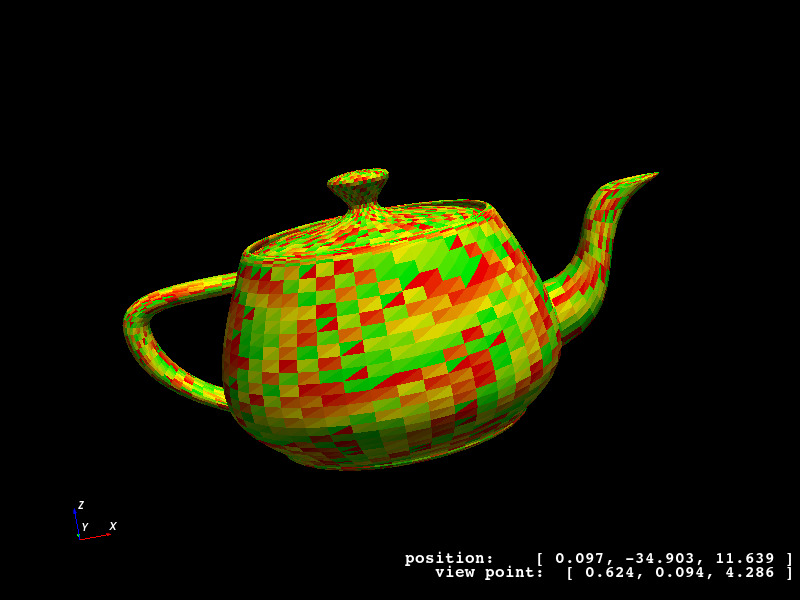
Works with GeometryViewer: Yes.
Works with MeshViewer: Yes.
An XML example is as follows:
<stl_file_surface name="cube_surface">
    <stl_file file="Menger_sponge.stl" scale="0.5" mesh_count="1"/>
</stl_file_surface>

<stl_file_surface name="teapot_lid">
    <stl_file file="Utah_teapot.stl" selector="-2267"/>
</stl_file_surface>

<stl_file_surface name="teapot_solid_body">
    <stl_file file="Utah_teapot.stl" selector="2268-"/>
</stl_file_surface>
Note that because the geometry is defined by an external file, the possible modifications in the KGeoBag framework
are limited. Besides the translations/rotations that can be applied to any object, one may also scale the external
geometry or increase its number of mesh elements. If the triangles in the file are sufficienctly ordered, then one
can use the selector attribute to specify indices of the triangles to be used in KGeoBag. In the case of the
Utah_teapot.stl example file, this allows to split the lid from the pot’s body.
<stl_file_surface>KGWrappedSurface<KGStlFile>Element |
Description |
|---|---|
Attribute |
Type |
Description |
|---|---|---|
|
|
Used as:
<stl_file_surface>in <geometry>
More information
Explained in: Complex Shapes in KGeoBag
Appears in the documentation:
Complex Shapes in KGeoBag (STL File Surface)
Used in example configurations: